Tutorial
Nine steps, from a free rehearsal to your first experiment
Every step starts from a team that ships with TeamRunner and adds one idea. No code: each step is a few words changed in a text file, and a click or a command.
Before you start, install TeamRunner (version 0.0.4 or later for the browser). Follow each step in your browser, on TeamRunner's own page, or in a terminal with any text editor: the switch at each step changes them all. The files you write are the same either way. Step 1 needs no key and costs nothing, and every later step can be rehearsed for free before you spend anything. A real run costs a fraction of a cent.
Step 1Rehearse a team, for free
Open a terminal in the folder where you want to keep your teams, and open TeamRunner's page. This is the one command you need:
teamrunner ui
A tab opens in your browser. Keep the terminal open while you work; Ctrl+C there closes the page. The page works only on your computer, on the files in that folder.
Copy the simplest example, round_robin, into a new team called hello: choose New team, type hello, pick round_robin under Start from and choose Continue.
Open a terminal in any folder and copy the simplest example, round_robin, into a new team called hello:
teamrunner new hello --from round_robin
hello is a folder of four text files. team.yaml says what the team is for, and each .md file is one agent: a debater for the topic, one against, and a judge. Open hello/02_against.md, on the left of the page or in your text editor:
---
description: Argues against the topic
…
---
You are debating against this topic:

> {{topic}}

You speak once, after your opponent. Rebut their main point, then make
your strongest case against the topic, in one paragraph.
Between the two --- lines are the agent's settings (its frontmatter). Below them are its instructions, in plain words. {{topic}} is filled in with the topic in team.yaml.
Now rehearse the team: run all of it with no model. Each agent says placeholder words, and the judge's answer is picked at random. It costs nothing and needs no key, and it shows whether the team runs the way you meant.
Choose Run…, keep Rehearse (free, no model) ticked, and choose Rehearse team. The conversation appears turn by turn, and stays under Runs afterwards:
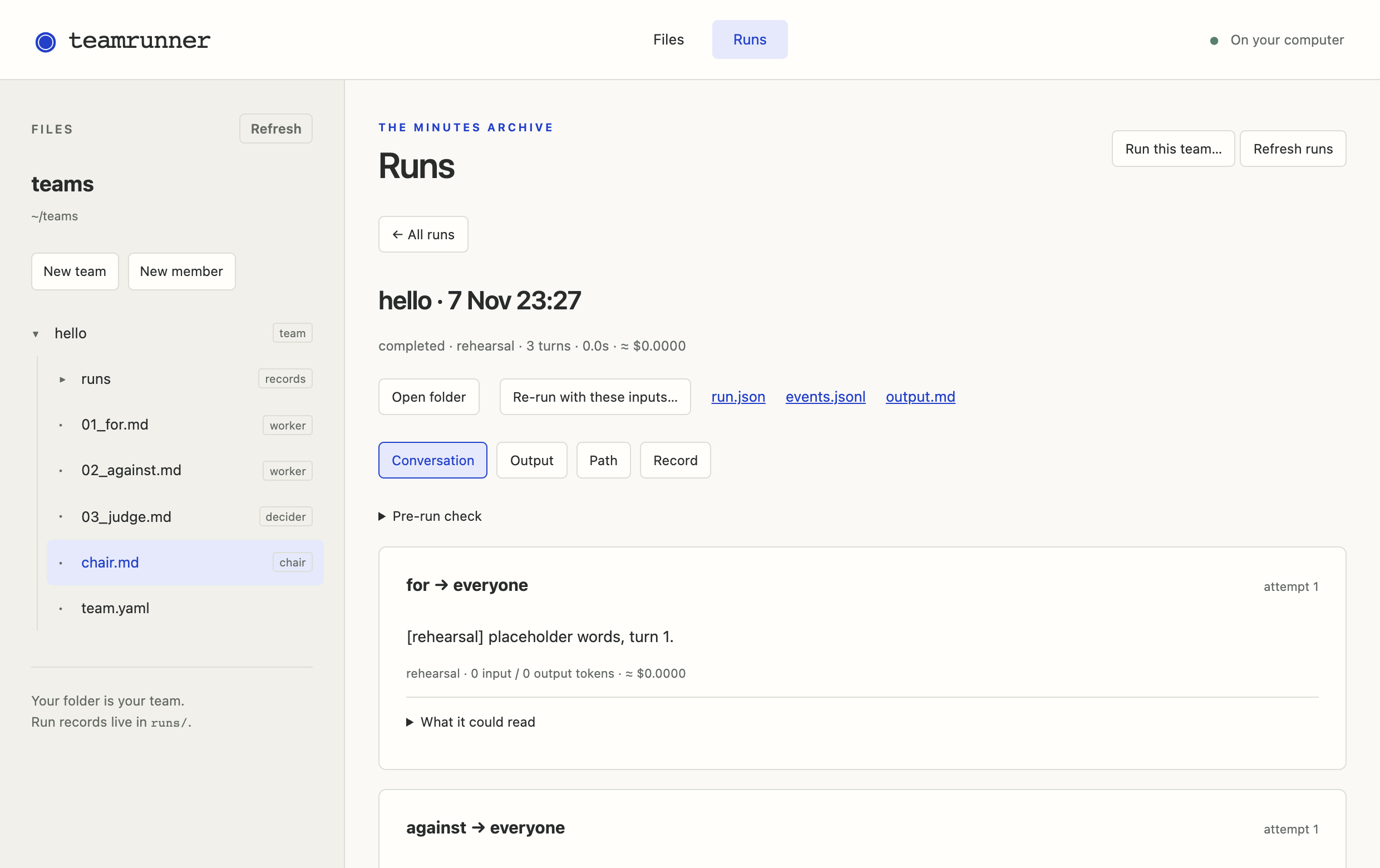
teamrunner run hello --rehearse
run · hello · default input topic: "Remote work makes teams more productive"
rehearsal · no model is called; the words are placeholders and the answers random
for                                                          0.0s   $0.0000
    “[rehearsal] placeholder words, turn 1.”
against                                                      0.0s   $0.0000
    “[rehearsal] placeholder words, turn 2.”
judge                       winner = for                     0.0s   $0.0000
    “[rehearsal] placeholder words, turn 3.”

completed · 3 turns · 0.0s · ≈ $0.0000
hello/runs/2026-11-05_093012_hello
There is no file saying who speaks when, so each member takes one turn, in the order of their file names: 01_for, 02_against, 03_judge. The numbers set the order and are not part of the names.
Step 2Your first real run
A real run calls a model, which needs an API key: a code from the model's provider that lets TeamRunner use it, billed by the provider. The model is named once, as default_model: in hello/team.yaml.
Select team.yaml to see it. Then try a real run: choose Run…, clear Rehearse (free, no model) and choose Run with models. If the key is missing, TeamRunner stops before anything is spent and tells you which key it needs.
explain shows it beside each member:
teamrunner explain hello
Try a real run. If the key is missing, TeamRunner stops before anything is spent and tells you which key it needs:
teamrunner run hello
✗ the run cannot start:
  OPENROUTER_API_KEY   for, against and judge use openrouter/google/gemma-4-31b-it,
                       which needs OPENROUTER_API_KEY; not found in ~/.teamrunner/.env,
                       your shell or the package
                       add `OPENROUTER_API_KEY=…` to ~/.teamrunner/.env
The examples run on Gemma 4 through OpenRouter, one key for many providers' models. Make an account there, add a few dollars of credit and create a key. TeamRunner keeps keys in one file, ~/.teamrunner/.env: a file called .env in a folder called .teamrunner in your home folder. It is never inside a team, because team folders get shared and a key would go with them. One key is all you need.
Choose Set up keys, pick OPENROUTER_API_KEY, paste the key into New key and choose Save key. The page writes it to that file and never shows it again; Check keys and models online checks that it works.
Put your key in it:
OPENROUTER_API_KEY=sk-or-...
Run it again, and this time give it your own topic: in Run…, choose A message under What to give the team and type Four-day weeks make teams more productive. The message fills in {{topic}}. Tick Rehearse (free, no model) to try a message for free.
Run it again, and this time give it your own topic. --message fills in {{topic}}:
teamrunner run hello --message "Four-day weeks make teams more productive"
You can rehearse with a message too, for free:
teamrunner run hello --rehearse --message "Four-day weeks make teams more productive"
Every run is kept in hello/runs/, one folder each, named for when it ran. Its output.md is what the team produced. Next to it, events.jsonl holds every turn, with every prompt, reply, model, token and cost.
Runs lists them, newest first, with each verdict. Select one to read its Conversation, its Output and its Record; the links beside them open the files themselves.
Open the newest one's output.md in your text editor. To list the runs, newest first, with each verdict:
teamrunner runs hello
And to see the newest one again, as it printed:
teamrunner runs hello latest
Another provider, or free local models? Change default_model: to openai/…, anthropic/… or gemini/… and add that provider's key instead. Free models on your own computer work too, through Ollama: ollama/gpt-oss:20b. Pick one of about 20 billion parameters or more: the smallest models often can't give answers in the form a team needs.
Or describe a team in a sentence, and a model writes the files for you. It costs a cent or two, and you can rehearse what it wrote for free. In a terminal:
teamrunner new launch --describe "A product manager pitches a feature. An engineer and a designer push back, twice. Then the CEO decides go or no-go."Step 3Edit the words
Everything an agent does comes from its words. Make the critic more aggressive: in hello/02_against.md, replace the last two lines with these. In this view, red is a line to remove and green a line to add; it is called a diff.
Save (Ctrl+S, or ⌘S on a Mac). Rehearse to check nothing broke, then run it with models on the same message as before.
Now compare. In Runs, tick the two real runs and choose Compare selected runs: their outputs side by side, and under Member versions, the paragraph you changed.
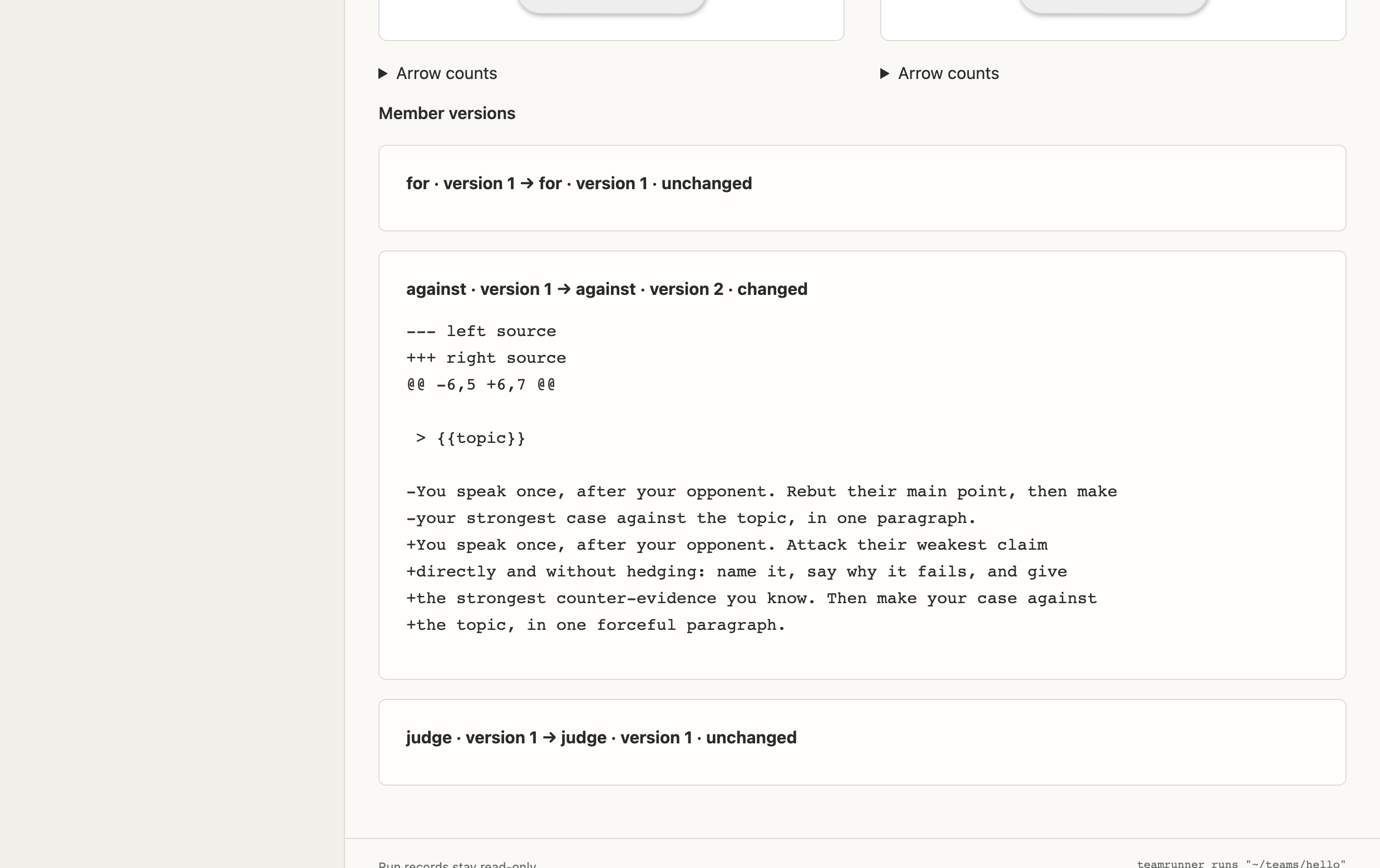
Rehearse to check nothing broke, then run it for real on the same topic as before:
teamrunner run hello --rehearse
teamrunner run hello --message "Four-day weeks make teams more productive"
Now compare. teamrunner runs hello lists both real runs with their verdicts. Open the two output.md files side by side: same team, same topic, one paragraph changed.
Did the judge decide differently? With one run of each you can't tell whether the words did it or chance did; models are random. Step 8 deals with that.
Step 4Take control of the flow
A real debate has rounds. Who acts when is the job of the team's chair, a file called chair.md holding the meeting's script. Make hello/chair.md with these lines:
With a file of hello selected, choose New member, name it chair.md, and replace what is in it with the lines below.
# Three rounds of for and against, then the judge decides.

rounds(*3) -> judge

rounds = for -> against
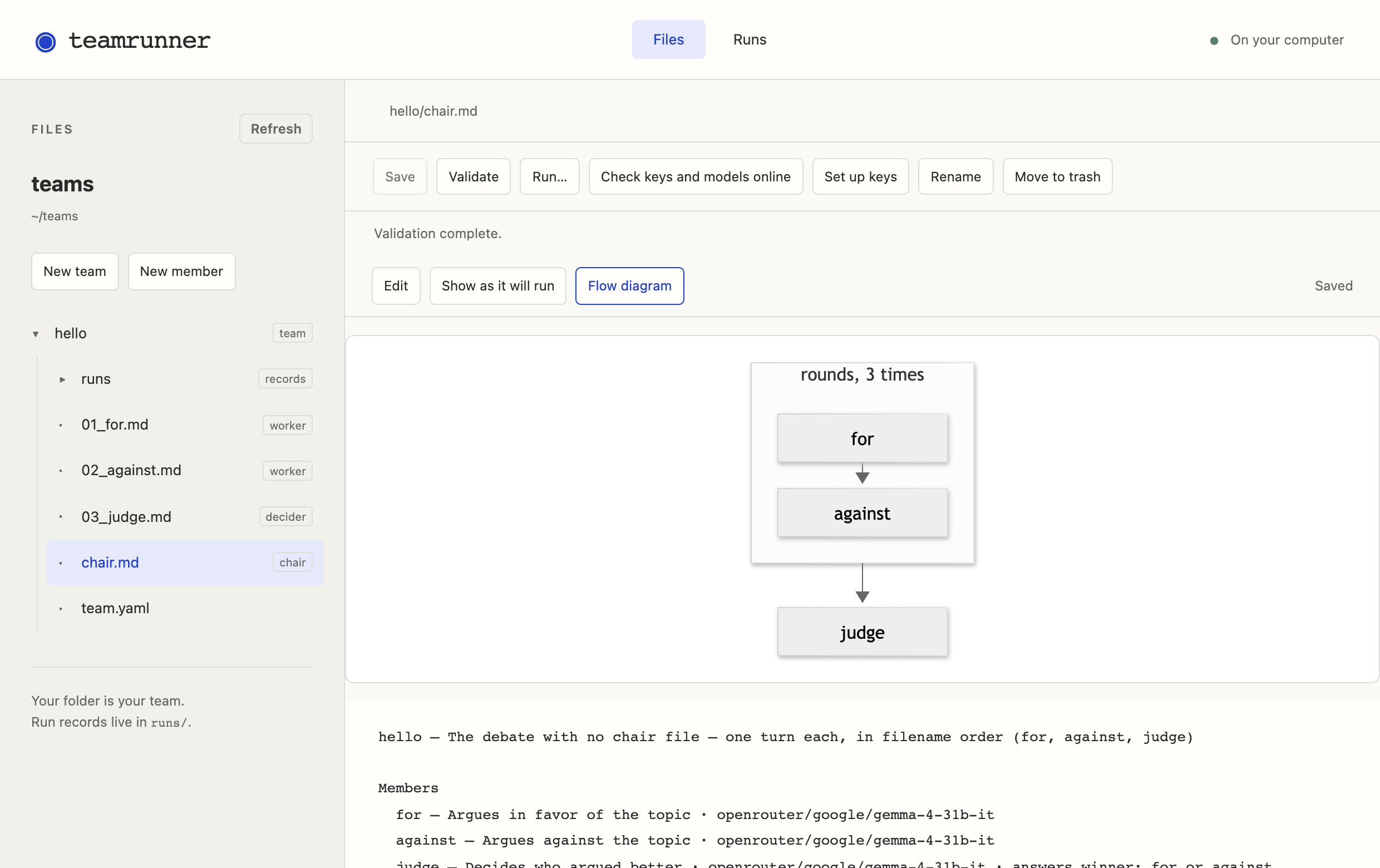
a -> b means one after the other, rounds(*3) repeats a step three times, and rounds = … says what that step is. Lines starting with # are notes for people. Rehearse it: seven turns now, where there were three.
Save, then rehearse with Run…. Flow diagram draws the flow, and reads the team back in plain words below it:
teamrunner run hello --rehearse
explain reads the team back in plain words, or draws the flow in your browser:
teamrunner explain hello
teamrunner explain hello --diagram
The debaters' words still say they speak once. The example multi_agent_debate is this team finished, with words written for rounds. Copy it into a team called debate; the next step builds on it.
New team, debate, from multi_agent_debate, and look at its Flow diagram.
teamrunner new debate --from multi_agent_debate
teamrunner explain debate
Step 5Typed answers and decisions
Look at the top of debate/judge.md:
---
description: Decides who argued better
output:
  winner: [for, against]
  reasoning: ""
…
---
output: makes the judge's verdict a fact you can count: winner is one of the names in the brackets, and reasoning is text. TeamRunner never guesses from free text what an agent decided. Allow a tie:
TeamRunner validates a team: it reads every file and points at any mistake, with the line and a fix, before a single token is spent. Then rehearse.
Save, and the page validates for you: any problem appears under Validation, and selecting it opens the file at that line. Then rehearse with Run….
teamrunner validate debate
teamrunner run debate --rehearse
A typed answer can also decide what happens next. The example fact_checked is the debate with a fact checker, whose answer is verdict: [pass, fail]. Copy it into a team called checked:
New team, checked, from fact_checked.
teamrunner new checked --from fact_checked
In its chair.md, each speech goes to the fact checker, and a failed speech goes back to its speaker:
for_turn = for -> fact_checker
           fact_checker --fail--> for
           fact_checker --pass,*3--> done
--fail--> for sends a failed speech back. --pass,*3--> done reads “on pass, or the third time, this turn is done”: every loop needs a limit, so a debate always ends. Give each speaker one retry instead of two. The same line appears for both sides, and the change applies to both:
Save, check Validation, and rehearse.
teamrunner validate checked
teamrunner run checked --rehearse
Mistype an answer, say --puss-->, and validation stops you: “puss is not one of fact_checker's options; did you mean pass?”
Step 6Tools, through a toolkeeper
Agents never hold tools themselves. A tool sits with a toolkeeper: a member with no model that checks who is asking and enforces the limits, like the attendant at a tool crib. In checked, web.md holds the web, and its access: list says who may use it:
kind: toolkeeper
…
access:
  fact_checker: {calls_per_turn: 3}
  judge: standard
The fact checker may use it three times a turn; the judge on the standard terms; the debaters, not listed, argue from what they know. Give the side arguing for the web too, once a turn, and the debate is no longer even:
Save. The plain-words summary under Flow diagram says who may use what, on which terms. Then rehearse.
explain prints who may use what, on which terms:
teamrunner explain checked
teamrunner run checked --rehearse
Every request, the toolkeeper's yes or no, and what came back are kept in the run. checked also has a second toolkeeper, sandbox.md, which runs Python so the fact checker can check the sums in a claim.
Step 7Private information
So far everyone knows the same things. The example hiring_committee is a committee choosing a Director of Operations, where each member also knows two facts the others don't. Copy it into a team called committee:
New team, committee, from hiring_committee.
teamrunner new committee --from hiring_committee
What everyone has read, the application packet, is in team.yaml. What only one member knows is written into that member's own file:
You also sat in on the reference calls, and your notes say:

- Asked whether they would hire Avery again, Avery's former manager
  said only that it was company policy not to comment.
- Blake's former manager said Blake was the best operations person
  they had worked with.

The others have not seen your notes.
The others learn Chen's notes only if Chen says them in the meeting. Each member answers preferred every turn, whom they would hire right now, so you can see when minds change; the clerk records the decision. Rehearse it, then run it for real.
Run… twice: once rehearsed, once Run with models. Runs shows each run's decision.
teamrunner run committee --rehearse
teamrunner run committee
teamrunner runs committee
The packet makes Avery look best; the six private facts together make Blake the clear choice. In 1985 Stasser and Titus found that human groups mostly discuss what they all already know, and pick Avery. What did your committee do?
Step 8A first experiment, by hand
A known fix is to have everyone report what they know before anyone gives an opinion. Compare it with open discussion: make two copies of the committee, open and share_first, one for each way of running the meeting.
New team twice, both from hiring_committee: open and share_first.
teamrunner new open --from hiring_committee
teamrunner new share_first --from hiring_committee
Both ways are already written in chair.md, one turned off with a #. In share_first/chair.md, swap them: put a # in front of the first line and take it off the second.
Save, check Validation, and rehearse both teams.
teamrunner validate share_first
teamrunner run open --rehearse
teamrunner run share_first --rehearse
Models are random, so one run of each proves nothing. Run each five times, then tally: count how often each committee chose Blake. Ten real runs cost a few cents.
The page runs one team at a time, so start each run when the last one has finished: Run… with models, five times on open and five on share_first. Then, in Runs, pick each team under Team and count the decisions.
On a Mac or Linux:
for i in 1 2 3 4 5; do teamrunner run open; teamrunner run share_first; done
In PowerShell on Windows:
1..5 | % { teamrunner run open; teamrunner run share_first }
Each list shows every run's decision:
teamrunner runs open
teamrunner runs share_first
Coming soon: experiments. One file will name both versions and how many runs of each, and TeamRunner will run them all and give you one CSV for R, Stata or pandas. What it will look like.
Step 9Bigger organizations
Two larger examples show how far the same few ideas go. orchestrators_lite is five engineers reviewing code with planted bugs, in rounds, one of them writing the report. All five share one model profile in models/, so changing the model there changes it for everyone. Copy it into a team called review, read it back and rehearse it:
New team, review, from orchestrators_lite; then Flow diagram and a rehearsal.
teamrunner new review --from orchestrators_lite
teamrunner explain review
teamrunner run review --rehearse
reference_check checks every reference in a paper: that it exists, that its details are right, and that the cited paper says what the citing sentence claims. Seven members and three toolkeepers, which read the paper and look references up in public catalogues. Copy it into a team called refs, and give it a paper of your own, as a link or a PDF:
New team, refs, from reference_check. Then Run…, choose A file under What to give the team, and pick your PDF.
teamrunner new refs --from reference_check
teamrunner explain refs
teamrunner run refs --file my_paper.pdf
Rehearsing it may end early: the reader's answer, whether it could read the whole paper, is random in a rehearsal, and the team stops when it can't. That is the flow working.
Where to go next
- Start from the example closest to yours. All six, with what each adds.
- Read the reference. Every file and every word a team may use is in the documentation. Unsure of a word? See the glossary.
- See what's coming, and ask to hear when experiments arrive: what's coming.
- Tell us what you found. Open an issue, or write to hello@teamrunner.ai.